
To improve Smart TV software performance in Dubai, ensure your TV’s Update software and apps, clear cache and unused apps, use Ethernet for stable streaming, adjust settings, and reset if needed to boost Smart TV performance in Dubai.
Quick Checklist: Fast Ways to Improve Smart TV Software Performance in Dubai
| Action | What It Does |
|---|---|
| Restart your Smart TV | Clears temporary glitches and refreshes system memory. |
| Restart your router | Resets network traffic and stabilizes connection. |
| Clear Smart TV cache | Removes outdated cached files to speed up app loading. |
| Close background apps | Frees up RAM and reduces CPU load. |
| Uninstall unused apps | Frees storage and improves overall responsiveness. |
| Update your apps | Applies performance and compatibility fixes. |
| Check available storage | Prevents “memory full” issues that slow down the TV. |
| Reduce streaming quality temporarily | Lowers buffering and stabilizes playback during network fluctuations. |
Factors Affecting Improve Smart TV Software Performance in Dubai
Check Your Internet
Many users attempt to improve Smart TV software performance in Dubai without checking internet speed first.
Most buffering issues come from unstable Wi-Fi, weak signals, or peak-hour congestion.
What to Check
- Run a speed test directly on the Smart TV if possible.
- For HD streaming, you need at least 10 Mbps.
- For 4K streaming, 25 Mbps or higher works best.
- Check for packet loss, high latency, or inconsistent speeds—common in crowded buildings.
If your TV is far from the router or your home relies heavily on wireless devices, you may notice performance dips even with a good plan
Improve Wi-Fi Strength in Dubai Homes
Weak Wi-Fi is one of the biggest causes of Smart TV lag in both Dubai apartments and villas.
How to Strengthen Your Wi-Fi
- Place your router higher and in the open — avoid cabinets and corners.
- Use 5GHz for faster speeds when the TV is close to the router.
- Use 2.4GHz if the TV is far away; it travels through walls better.
- Upgrade to a mesh Wi-Fi system for larger villas or multi-story homes.
- Update router firmware to reduce interference.
- Switch Wi-Fi channels if your building has congested networks.
Improving Wi-Fi coverage has a direct impact on Smart TV performance, especially if you stream on Netflix, YouTube, or Amazon Prime Video.
Update Firmware & Apps to Fix Lag
Smart TVs rely heavily on firmware to manage speed, memory, and app behavior. If you want to improve Smart TV software performance in Dubai, keeping the firmware updated is essential.
Why Updates Matter
- Fix bugs and crashes
- Improve connection stability
- Reduce buffering
- Enhance app compatibility
Check for system updates under your TV’s settings menu. Also update individual apps like Netflix, YouTube, OS services, and system components. Outdated versions can slow the entire TV.
Clear Storage & Manage Cache for a Faster TV
When your Smart TV storage is full, performance drops sharply. Clearing space is one of the easiest ways to improve speed.
What to Do
- Delete apps you don’t use
- Clear app cache and temporary files
- Remove unused screen savers or themes
- Turn off auto-download updates you don’t need
Freeing storage improves menu navigation, app launching, and overall system responsiveness.
Advanced Techniques for Performance Enhancement
For users who want deeper optimization and maximum speed, these methods offer noticeable improvements.
1. Installing Third-Party Apps
Certain apps can improve streaming quality and software stability, such as:
- Clean-up tools
- Network speed testers
- DNS switch apps (Android TV)
Use trusted sources only.
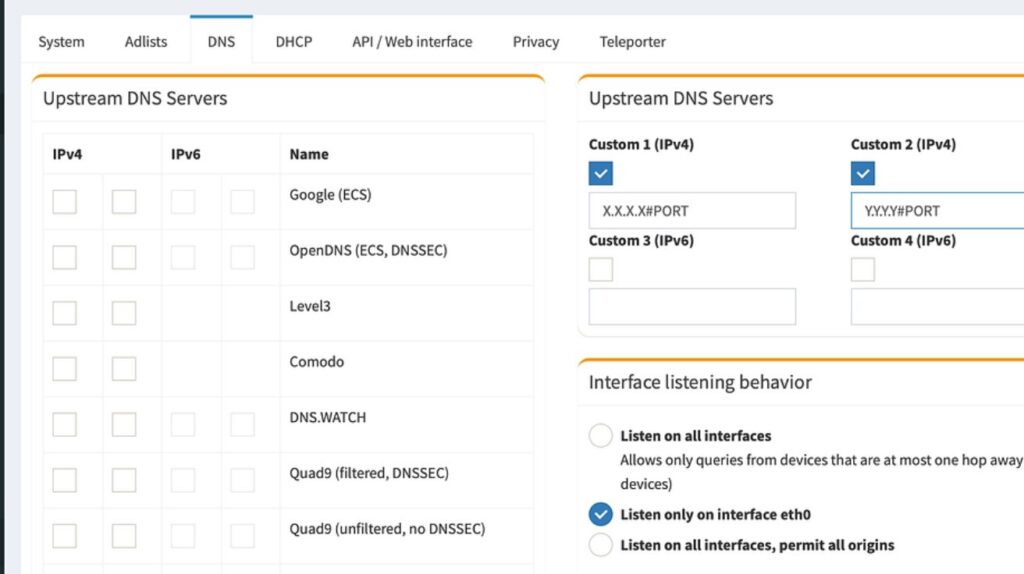
2. Changing DNS Settings
- How DNS affects speed:
A faster DNS reduces website lookup time and improves streaming responsiveness. - Best DNS options for Dubai:
- Google DNS: 8.8.8.8
- Cloudflare DNS: 1.1.1.1
- OpenDNS: 208.67.222.222
Changing DNS can reduce buffering and improve app loading times.
3. Using Streaming Devices
Sometimes the TV hardware is the bottleneck. Upgrading to an external device can dramatically improve performance:
- Amazon Fire TV Stick 4K
- Apple TV
- Nvidia Shield
- Chromecast with Google TV
These devices offer faster processors, better app support, and smoother interfaces.
Tips to Improve Smart TV Software Performance
Improve Smart TV Software Performance in Dubai Using Better Network Setup
Smart TVs in Dubai often struggle due to thick walls, large villa layouts, and crowded Wi-Fi environments. A strong network setup is one of the fastest ways to boost performance.
Why Ethernet Is Better Than Wi-Fi
A wired Ethernet connection provides a direct, stable link to the router, reducing:
- Latency
- Packet loss
- Buffering
- Slow app loading
For 4K/UHD streaming, Ethernet almost always performs better—especially in homes with many connected devices.
Tips for Stronger Network Performance
- Use Cat6 cables for higher stability.
- Try powerline adapters if cables can’t reach your TV.
- Upgrade to a dual-band or tri-band router for better coverage.
- Place the router high and central for stronger Wi-Fi reach.
A proper network setup often fixes buffering, lagging apps, and A/V delays instantly.
Picture & Streaming Settings That Boost TV Performance
Your TV’s picture and streaming settings can also affect software speed.
Lower Bitrate & Disable Heavy Processing
To avoid buffering during speed drops:
- Lower the bitrate
- Enable adaptive streaming
Turn off heavy processing modes like:
- Motion smoothing
- Noise reduction
- Dynamic contrast
This reduces processor load and makes your TV faster and more responsive.
Use Efficient Codecs
Select modern codecs like H.265 (HEVC) or AV1 for better quality at lower bandwidth. This helps maintain smooth playback, even during Dubai’s peak hours.
Improve Smart TV Software Performance in Dubai with Fixer Master Dubai
If your Smart TV is slow, apps freeze, or streaming buffers in Dubai, Fixer Master Dubai offers expert solutions tailored to local networks to improve Smart TV software performance in Dubai.
Why Choose Fixer Master Dubai:
- Certified Technicians: Experienced with Samsung, LG, Sony, and Android TVs.
- Same-Day Troubleshooting: On-site service across all Dubai neighborhoods.
- Comprehensive Fixes: Wi-Fi connectivity, firmware updates, and app optimization.
- Legal Guidance for Geo-Restricted Apps: Support with region-limited streaming services.
- Affordable & Transparent Pricing: Clear quotes with no hidden fees.
- Flexible Support Options: On-site or remote solutions for convenience.
Professional Repair & Software Optimization for Smart TVs
Fixer Master Dubai provides fast, professional troubleshooting to enhance your TV’s performance. Certified technicians resolve software glitches, Wi-Fi connectivity issues, and app errors across all major brands.
Call 052 788 6093 or book online for expert support to improve Smart TV software performance in Dubai today.