
Burn-in isn’t a myth. It isn’t a rumor. And it definitely isn’t “rare,” as some marketing slogans claim. It’s a very real, very annoying problem that can permanently scar your TV or smartphone screen.
So let’s break down what OLED burn-in issues really are, why it happens, the signs, prevention tips, and whether you should panic or just relax and enjoy the show.

What Is OLED Burn-In, Actually?
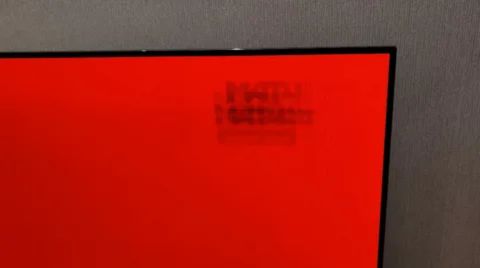
Imagine watching news channels every day where the same ticker runs in the same spot for hours. Or playing games with a static health bar etched on the screen. Over time, those unchanging images can “ghost” into your OLED display, leaving behind permanent discoloration or shadows.
This is OLED burn-in.
Technically, it happens because individual OLED pixels degrade at different rates. When certain pixels display the same shape or color for too long, they wear out faster—and once they degrade, there’s no true “reset.” The result?
A faint but stubborn mark that stays on your screen no matter what you watch.
Why Does OLED Burn-In Happen?
Even though OLED is a premium technology, it comes with one big weakness: organic pixels age over time. Here’s what accelerates the aging:
| Cause | Description | How It Accelerates Burn-In |
|---|---|---|
| Static Elements | Logos, scoreboards, app icons, navigation bars, and other elements that stay in one place for long periods. | Specific pixels stay active continuously, aging faster than surrounding pixels. |
| High Brightness Levels | Keeping the TV brightness at maximum for long viewing sessions. | Intense brightness overheats and rapidly wears out organic pixels, similar to “sunburn.” |
| Continuous Usage | TV or screen left on for long hours without breaks. | Constant display activity leads to uneven pixel degradation over time. |
| Gaming HUDs | Health bars, maps, ammo counters, and static game menus. | Repeated exposure to unchanging shapes causes localized pixel wear. |
| News & Sports Channels | Persistent tickers, channel logos, scoreboards, and info bars. | Long-running static overlays burn faint shadows into the screen. |
Early Signs of OLED Burn-In
You might not notice it at first. But once you see it… you can’t unsee it.
Watch for:
- Ghostly shadows of previous images
- Discolored patches that don’t blend with other colors
- Persistent logos faintly visible even after changing channels
- Uneven brightness across the display
- Pink, blue, or green tint around areas that stay static
If any of these symptoms appear, your screen is waving a warning flag.
How to Prevent OLED Burn-In: Simple But Effective Tips
If you want your OLED to stay fresh and flawless, follow these tips:
- 1. Reduce Static Content
- 2. Lower Brightness
- 3. Enable All Screen Protection Features
- 4. Avoid Keeping the Same Channel for Hours
- 5. Gaming Precautions
- 6. Let Pixel Refresher Run
| Tip | What to Do | Why It Helps |
|---|---|---|
| 1. Reduce Static Content | Avoid long pauses, switch channels, move menus, and change game settings. | Prevents pixels in one area from aging faster due to repeated static images. |
| 2. Lower Brightness | Keep brightness between 40–60% instead of max. | Reduces pixel stress and heat, slowing down organic pixel wear. |
| 3. Enable Screen Protection Features | Keep pixel shift, screensaver, and auto-dimming ON. | Built-in tools automatically reduce long-term image retention. |
| 4. Avoid Keeping the Same Channel for Hours | Especially avoid news channels with constant tickers and logos. | Minimizes static elements that can “etch” into the screen over time. |
| 5. Gaming Precautions | Hide HUDs, take breaks, rotate game titles. | Gaming HUDs are static; breaks and variety reduce localized pixel burn. |
| 6. Let Pixel Refresher Run | Don’t unplug the TV immediately; allow refresh cycles to complete. | Refresh cycles recalibrate and clean pixels to prevent early burn-in. |
Need Help??? Fixer Master Dubai for Professional OLED Repair
If you’ve spotted burn-in, color patches, ghost images, or uneven brightness on your OLED screen, don’t wait for the problem to spread. Fixer Master Dubai is the city’s trusted expert for advanced OLED diagnostics and panel restoration. Their certified technicians use specialized tools and genuine components to assess the issue accurately—and fix what others often can’t.
Fast service, honest pricing, and same-day support make them the go-to choice for reliable OLED and TV repairs across Dubai.
Don’t Let Burn-In Ruin Your OLED!
Call Fixer Master Dubai today for fast, reliable, and professional OLED repair. Restore your screen’s brilliance before it’s too late!