
Samsung TV Repair in Al Warqa Dubai — Same-Day Certified Service at Your Door.
TV repair Al Warqa Dubai is available same day with Fixer Master — certified technicians visit your apartment for all TV brands and faults.
TV not working in Al Warqa, Dubai? The most common TV faults in Al Warqa homes are a dark or black screen, no sound, Wi-Fi not connecting or a completely dead TV. In most cases the fault is a failed component inside the TV that needs a technician. Fixer Master Dubai offers same-day doorstep Samsung TV repair for all models in Al Warqa, Dubai. Call 052 788 6093.
Samsung TV Repair in Al Warqa Dubai.
Quick answer: a Samsung TV that needs repair in Al Warqa, Dubai usually has one of nine causes. The backlight has failed — the screen is black but you can hear sound. The power board has failed — the TV is completely dead. The main board has a fault — the TV freezes or shows coloured lines. The HDMI board has failed. The screen has cracked. A software fault is causing crashes. The Wi-Fi module has failed. The remote control sensor is damaged. Or a speaker fault is causing no sound.
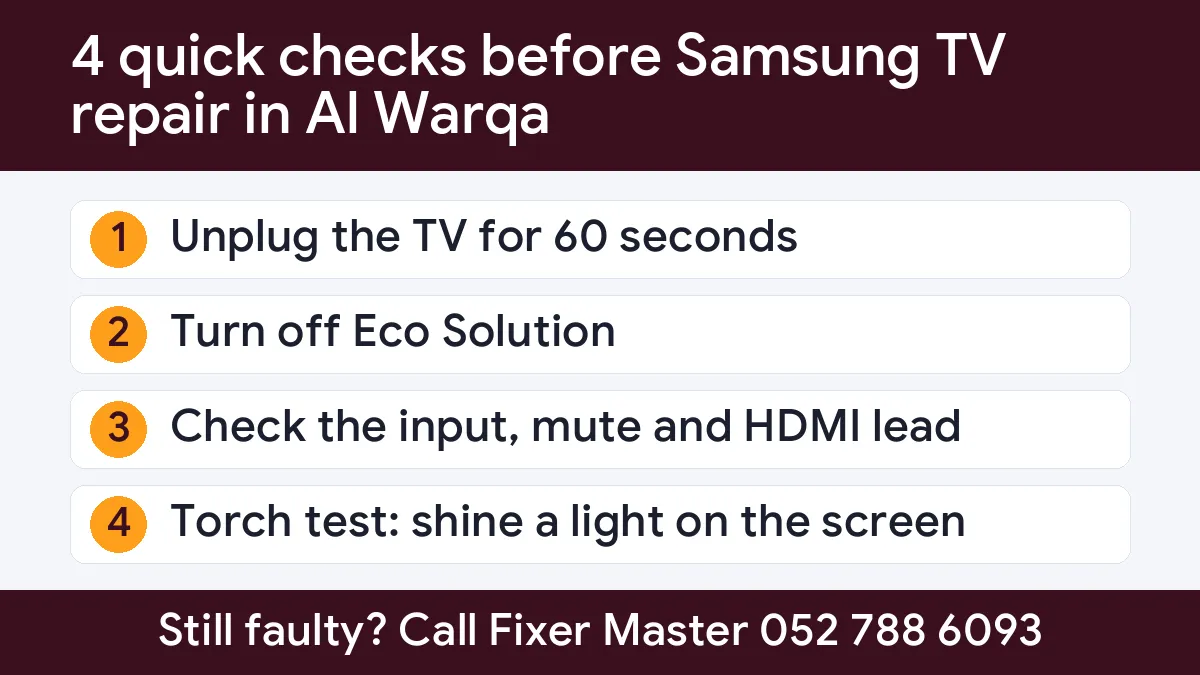
Start with the free checks. Unplug the TV from the wall socket for 60 seconds, then plug back in and switch on using the TV’s own power button. If the TV powers on and the fault clears, it was a software freeze. If the fault returns, the fault is a hardware component.
For more help, see our TV repair in Dubai page and our TV repair cost guide for Dubai.
Seven Samsung TV Faults We Fix Most Often in Al Warqa.
These seven TV fault patterns cover the most common Samsung TV repairs we do in Al Warqa, Dubai. Find yours, then read the likely cause.
Black Screen, Sound Works .
You can hear the show but see nothing. The LED backlight has failed — one of the most common TV repairs in Dubai.
TV Completely Dead .
No standby light, no picture, no sound. The power board has failed or a fuse has blown.
Lines or Coloured Blocks .
Vertical or horizontal lines, coloured patches. The main board or T-con board is likely faulty.
TV Freezes or Crashes .
Apps freeze, the picture crashes or the interface is unresponsive. A software fault or failing main board is likely.
No Sound .
Picture works but no audio. The audio board has failed, or the TV settings have been changed.
Screen Too Dark .
The picture is very dim. The LED backlight is failing, or energy-saving mode is dimming the screen automatically.
Wi-Fi Not Connecting .
The TV cannot connect to any Wi-Fi network. The Wi-Fi module has failed or a firmware update is needed.
Nine Reasons Your Samsung TV Needs Repair in Al Warqa.
Here is the answer to why a TV needs repair in Al Warqa, Dubai, from the easiest fix to the hardest:.
- Failed LED backlight: The TV has sound but a black or very TV fault. Common in Dubai due to heat stressing the LED strips.
- Power board failure: The TV is completely dead — no standby light, no picture, no sound.
- Main board fault: The TV turns on but freezes, shows coloured lines, or crashes with a black screen.
- Backlight driver failure: The picture dims after minutes, or the screen flickers.
- HDMI board fault: No signal from specific HDMI ports.
- Screen damage: Cracks, dark patches or dead pixels on the panel itself.
- Software crash: The TV freezes, apps crash or the interface is unresponsive.
- Wi-Fi module failure: The TV cannot connect to Wi-Fi on any network.
- Speaker or audio board fault: Sound cuts out or produces buzzing and distortion.
Dubai’s heat and humidity stress TV components harder than in cooler climates. Power boards and LED strips fail sooner in apartments and villas with poor ventilation. The table links each symptom to a quick test and who can fix it.
| Fault | What You See | Quick Test | Who Fixes It |
|---|---|---|---|
| Black screen, sound works | You can hear the show | Hold torch near screen in dark | Technician |
| TV completely dead | No standby light at all | Check wall socket and plug | Technician |
| Lines on screen | Vertical or horizontal lines | Power cycle and check HDMI | Technician |
| TV freezes or crashes | Apps or picture freezes | Power cycle at wall for 60s | You or technician |
| No sound | Picture works, no audio | Check TV audio settings | You or technician |
| Screen too dark | Dim picture | Turn off energy saving mode | You or technician |
| No Wi-Fi connection | TV cannot find any network | Restart router and TV | You or technician |
Which TV Fault Is Most Urgent?
Quick Settings Fix .
Energy saving, firmware update and factory reset faults are free to fix from the TV settings menu.
Quick Technician Fix .
Power board, HDMI board and audio board faults are quick repairs with standard parts.
Specialist Repair .
Main board, LED backlight and T-con board repairs need specialist tools and diagnosis.
TV Repair Al Warqa: Fault and Fix Table.
Use this table to match the fault pattern with the likely cause and next step for TV repair in Al Warqa, Dubai.
| Pattern | Most Likely Cause | Free Check | Next Step |
|---|---|---|---|
| Black screen, sound works | Failed LED backlight | Hold torch near screen | Book technician |
| Completely dead | Power board | Check socket and plug | Book technician |
| Lines or coloured blocks | Main board or panel | Power cycle, check HDMI | Book technician |
| Freezes or crashes | Software or main board | Power cycle for 60 seconds | Update firmware |
| No sound | Audio board or settings | Check audio settings | Book technician if persists |
| Screen too dark | Energy saving or backlight | Turn off energy saving | Backlight test if persists |
Nine Safe Checks Before Calling a TV Technician.
Work through these nine checks before calling a TV technician:.
- Power cycle at the wall: Unplug the TV from the wall socket (not just standby). Wait 60 seconds. Plug back in and power on from the TV’s own button. This clears software freezes.
- Check the wall socket: Try a different socket or plug a different appliance in. Surge damage and power trips cause dead TVs that appear to be hardware faults.
- Check the remote: Press the TV’s own power button. If it works from the button but not the remote, the issue is the remote, not the TV.
- Test another HDMI source: If the screen is black, swap to a different HDMI source or to the TV’s built-in apps. A black screen on one input only means the fault is the HDMI device, not the TV.
- Turn off energy saving: If the screen is very dark, go to Settings and turn off Energy Saving and Ambient Light Detection. These settings dim the screen automatically.
- Update the firmware: An outdated firmware causes crashes, freezing and app failures. Go to Settings — Support — Software Update.
- Restart the smart TV apps: If only streaming apps crash, clear the app cache or delete and reinstall the app.
- Do the torch test: In a dark room, hold a torch close to the screen while the TV is powered on. If you can see a faint picture, the backlight has failed.
- Check for physical damage: Look for cracks, dents or burn marks on the TV back panel. Physical damage needs a technician.
Stop and call a technician if the TV smells of burning, sparks, or shocks you. Do not open the back panel.
Samsung TV Still Not Working After These Checks?
Nine checks done and the TV still does not work? The fault is a hardware component inside the TV. Unplug and send us the model label, a description and a short video. Our technician covers Al Warqa, Dubai and all of Dubai, often the same day.
How We Repair TVs in Al Warqa.
We follow five clear steps to repair a TV in Al Warqa, Dubai. Most repairs happen at your door.
Send the TV model label, fault description and a short video. Our technician tests the power board, LED backlight, main board and HDMI board, then tells you the cause and cost before any repair starts.
1. Send Model and Video .
TV model label, fault description and a short video.
2. Pick Your Visit Time .
Today, tonight or tomorrow — same-day in Al Warqa.
3. Test Power and Backlight .
Power board, LED strips and main board all tested.
4. Learn Cause and Cost .
Price confirmed before any repair begins.
5. Fix and Soak Test .
TV runs a live picture before we leave to confirm the fix.
Samsung TV Settings and Performance Tips for Al Warqa Homes.
Wrong settings on a Samsung TV often cause problems that look like a hardware fault. Check these before calling a technician.
Eco Solution — Settings > General & Privacy > Eco Solution. Turn off Ambient Light Detection and Energy Saving Mode. In bright Al Warqa rooms these settings dim the screen and trigger unnecessary calls.
Picture Mode — Standard and Movie modes look dim in a bright living room. Switch to Dynamic or Filmmaker Mode and adjust Brightness manually.
Smart Hub and Network — If Samsung Smart Hub keeps disconnecting in Al Warqa, go to Settings > General > Network > Reset Network. Switch to 2.4GHz if walls block 5GHz.
Software Update — Settings > Support > Software Update > Update Now. A missed Samsung firmware update causes black screens and Smart Hub crashes. Always update before calling for a repair.
Repair or Replace Your TV?
Is a TV worth repairing? Usually yes. A backlight strip repair costs far less than a new TV. Power board and main board repairs are also cost-effective. Panel damage and severe burn-in on OLED sets are the main cases where replacement may be better.
Why Al Warqa Homes Choose Fixer Master.
Here is what comes with each home visit for TV repair in Al Warqa, Dubai.
- Technician reaches Al Warqa day and night .
- Same-day visits where the schedule allows .
- Price confirmed before any TV repair .
- All faults diagnosed before repair starts .
- All major UAE TV brands covered .
- Samsung, LG, Sony, TCL, Hisense, Toshiba handled .
- Repair or replace advice given .
- Soak test before we leave .
How to Make Your TV Last Longer in Dubai.
Good habits to protect your TV in Dubai:.
- Use a surge protector — Dubai power cuts and surges damage TV power boards.
- Leave a 10cm gap around the TV for ventilation. Heat is the main cause of LED strip failure.
- Update firmware when prompted to prevent software crashes.
- Clean dust from the TV vents monthly.
- Avoid direct sunlight on the screen.
TV Repair in Al Warqa and Across Dubai.
Fixer Master covers all Al Warqa clusters for tv repair international city dubai. See also: TV repair Dubai, TV repair Deira, TV repair cost Dubai, LED TV lifespan guide. Call: +971 52 788 6093.
- Al Warqa .
- Al Warqa .
- Dubai Silicon Oasis .
- Dubai Production City .
- Al Karama .
- Business Bay .
- Downtown Dubai .
- Al Barsha South .
- Jumeirah Lakes Towers (JLT) .
- Jumeirah Park .
- Dubai Investment Park (DIP) .
- Jabal Ali First .
- Al Furjan .
- Discovery Gardens .
- Jumeirah Village .
- Dubai Sports City .
- Jumeirah Triangle .
- Arabian Ranches .
- Arabian Ranches 2 .
- DAMAC Hills .
- Al Warqa Dubai .
- Jumeirah Islands .
- The Meadows .
- Al Barsha .
- JVC .
- JVT .
- Dubai Studio City .
- Motor City .
- Green Community East .
- Green Community West .
- Dubai Land .
- Al Mizhar 1 .
- Al Mizhar 2 .
- Al Mizhar 3 .
- Al Khawaneej 1 .
- Al Khawaneej 2 .
- Al Khawaneej 3 .
- Al Qusais .
- Mirdif .
- Al Warsan .
- Nad Al Hammar .
- Al Rashidiya .
- Oud Al Muteena 1 .
- Nad Al Sheba 1 .
- Nad Al Sheba 2 .
- Meydan .
- Meydan South .
- Mohammed Bin Rashid Al Maktoum City .
- DIFC .
- City Walk .
- Jumeirah 1 .
- Al Badaa .
- Al Jaddaf .
- Al Awir .
- Dubai Marina .
- Palm Jumeirah .
- Dubai Hills Estate .
- The Greens .
- Jumeirah 2 .
- Jumeirah 3 .
- Al Wasl .
- Bur Dubai .
More TV help: our TV repair cost guide Dubai shows what each repair costs, and our LED backlight repair Dubai guide covers the most common fault.
TV Repair Al Warqa: Common Questions Answered.
How much does TV repair in Al Warqa Dubai cost?
Do not live without a working TV. Call Fixer Master for same-day doorstep TV repair in Al Warqa, Dubai and across all of Dubai. Phone or WhatsApp us at any hour.
Do you repair all TV brands in Al Warqa?
A TV repair in Al Warqa in the daytime usually means strong sunlight washes out the picture, and a low peak brightness makes it worse. Close the curtains and compare. Choose a brighter picture mode for daytime and keep the screen away from direct glare. If it stays dim even in shade, ask us to test the backlight.
Can you fix my TV at home in Al Warqa?
A TV repair in Al Warqa with HDR happens when HDR content looks dim when the TV or the box is not set up for it. Check the HDR setting on both, use a certified HDMI lead and update the software. If a normal show looks fine, the settings are the cause, not a fault.
How long does TV repair in Al Warqa take?
Often yes. Turn off energy saving and the light sensor, reset the picture mode and test another source. These steps are safe and free. If the picture stays dim or half the screen is dark, the backlight needs a professional test. Do not open the TV.
Is it worth repairing a TV or buying new in Dubai?
In a dark room, hold a torch close to the screen with the TV on. If you can see a faint picture, the panel works and the backlight has failed. Do not press on the glass. Tell us what you see and we will plan the repair.
What TV faults do you fix in Al Warqa?
A TV repair in Al Warqa on one side usually means a failed LED strip in the backlight. The strips run in groups, so one group can fail while others work. Take a photo of the dark area and send it on WhatsApp. We will advise on repair.
How do I book a TV technician in Al Warqa Dubai?
A TV repair in Al Warqa after minutes? Heat can push a weak backlight driver or tired LED strips into protection mode. Clear the vents, leave space around the TV and let it cool. If the picture dims again within minutes, switch off and call us for a power and backlight test.
Do you repair Smart TVs and Android TVs in Al Warqa?
Check Eco Solution, Ambient Light Detection and the picture mode first. If the settings are clear, test another source and run the torch test. A faint picture means the backlight needs repair. Call us for a home visit and a firm price.
Samsung TV Not Working in Al Warqa? Call Fixer Master Now.
Do not live with a dim picture. If you still face a TV repair in Al Warqa, call Fixer Master for a home test in Al Warqa and all of Dubai. Phone or message us at any hour, and we will find you a slot, often the same day.